
How to Get More Google Reviews in 2026: A Playbook for Local Operators
Almost every local-business owner I talk to says the same thing about reviews: they know reviews matter, but asking feels weird, and they never know when the right moment is. Honestly, it usually is weird when you're winging it. The owners who actually end up with a real stack of reviews aren't running better businesses than everyone else. They've just stopped relying on themselves to remember to ask. Once it becomes automatic, you stop thinking about it, and the reviews start showing up.
This is the playbook I've seen work for salons, restaurants, and home-service companies that went from a handful of reviews a year to three or four a week. No bribes, no scripts that feel like a hostage situation, and nothing that breaks Google's policies. I'll cover the strategic frame first, then the tactics, then the places people tend to trip themselves up.
What Most Owners Get Wrong About Asking for Reviews
The standard advice is "just ask." Sure, of course you should ask. But that doesn't actually tell you anything. The owners I've seen treat the ask as a personal favor, walking up to regulars and saying "hey, would you mind," tend to burn out on it within a quarter. It doesn't scale, it puts the awkwardness on the most expensive person in the building, and a lot of customers feel cornered by it.
What works is the opposite frame. The ask is a system that runs on its own. It happens to every customer, not just the ones the owner happens to remember. And it reaches them while the experience is still fresh, usually within an hour, instead of three days later when they're already thinking about something else.
That's the gap between businesses that pull in five reviews a year and businesses that pull in five a week. Same service and same customers, just a system that doesn't depend on anyone remembering anything.
Why the Timing Window Is Tighter Than You Think
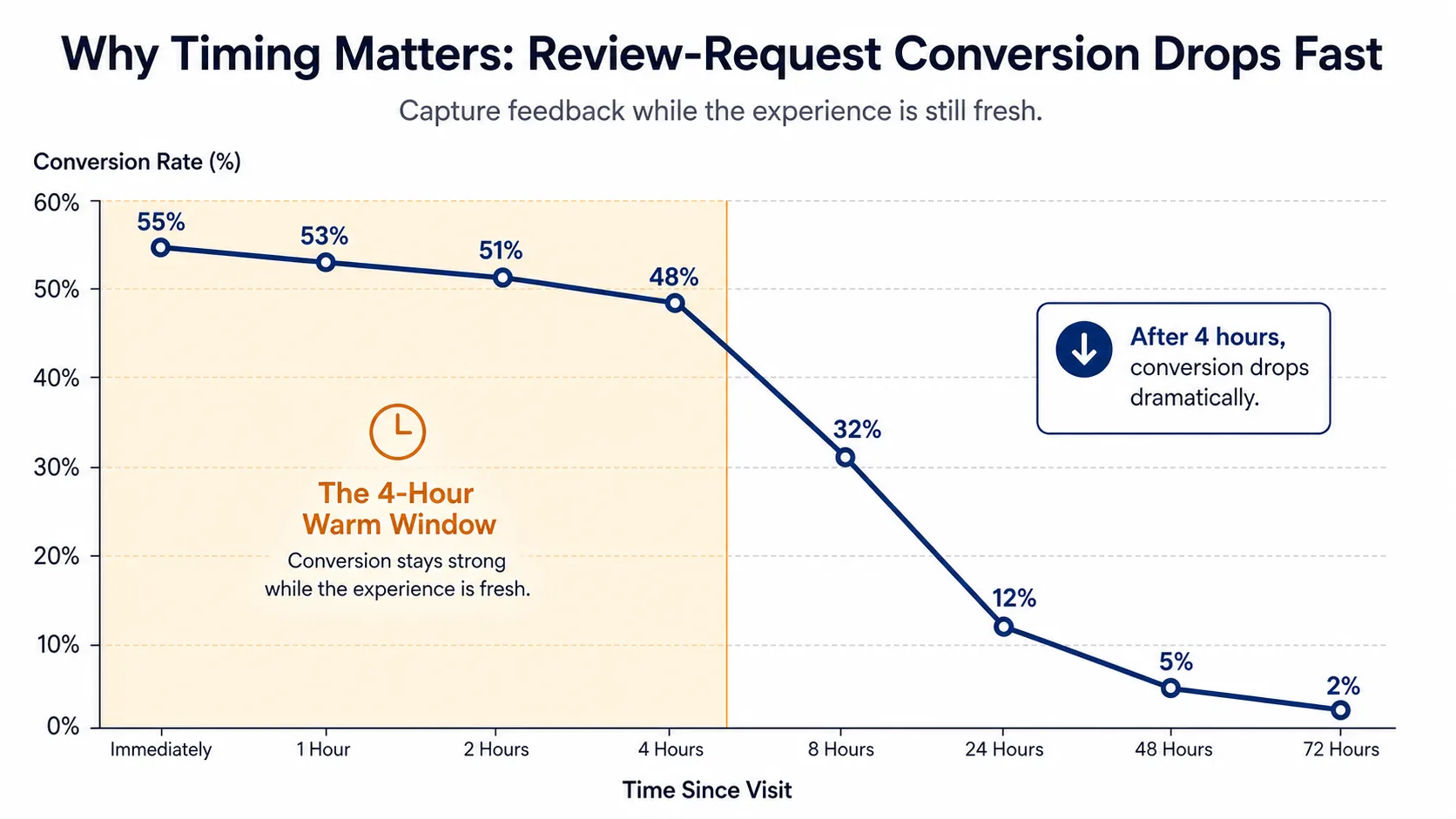
After a good experience there's a short window where the customer is still feeling it, and a small ask doesn't really feel like work. For most local businesses, that window runs from about thirty minutes to four hours. After that, the visit gets buried under everything else happening in their day, and conversion drops hard.
In my experience, the same business sending the same exact message will convert over 25% of requests inside the four-hour window and under 4% after twenty-four hours. The text isn't different. The customer isn't different. It's just that the window's closed.
This is why "we'll send out a review-request email at the end of the month" produces basically nothing. By the time the email shows up, the customer has forgotten what they came in for. And it's why owners who try to remember to ask the next day always lose to the ones who set it up to fire the same afternoon.
The window is even tighter for SMS than email
SMS gets opened in the first few minutes and actually read. Email gets opened sometime in the first day, if it gets opened at all. So when we talk about the warm window in practical terms for local businesses, what that really means is: the review request needs to go out by text, within about an hour. Email's a follow-up, not the primary ask.
If you can only run one channel to start, run SMS. I unpack the conversion gap in the email vs SMS post.
Where the Ask Should Live (and Where It Shouldn't)
A handful of placements work well. A handful are pretty bad. The bad ones tend to be the obvious ones, which is why most businesses default to them: the printed receipt with a QR code in 6-point gray, the "leave us a review!" sticker stuck to the front door, the once-a-quarter email blast. None of those actually put the ask in front of someone at the right moment with low enough friction.
The placements that work tend to share three things. The ask reaches the customer while they're still warm. It takes them under ten seconds to act on. And it shows up somewhere they actually check. In practice, three placements account for almost all the volume.
1. Post-visit SMS
A short, personalized text within an hour of the appointment ending. Mentions the staff member by name when you can. Puts the Google review link first so it's the obvious thing to tap. Doesn't try to do anything else: no upsell, no survey, no marketing. Just a thanks and a link.
This is the highest-converting placement I've seen for almost every category. For salons and dental practices, it routinely converts above 30% of sent requests into a published review. (For why, see the post on review-request automation.)
2. Counter or check-in iPad
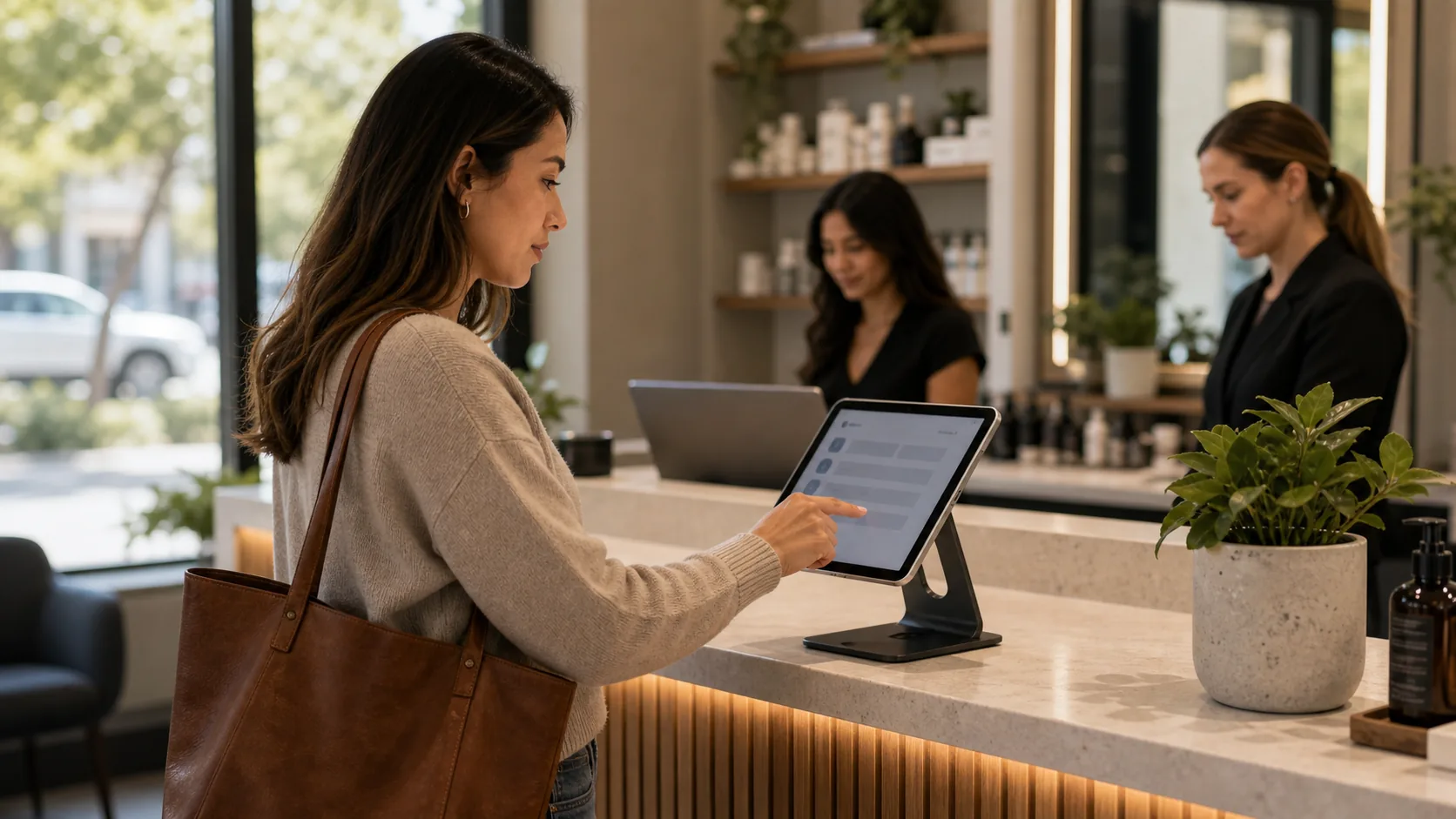
For walk-in businesses like cafes and urgent care, an iPad at the counter that captures the customer's name and phone in two taps does two jobs at once. It logs the visit, and it kicks off the post-visit SMS automatically. The customer doesn't have to do anything different from what they're already doing, and nobody on staff has to remember to ask. The ask just happens.
The kiosk approach also lets you measure walk-in conversion in a way most businesses have never been able to. You can see how many people came in, how many left a review, the percentage, and how it shifts when you tweak the message.
3. Post-call or post-job follow-up for service businesses
For HVAC and anything else done at the customer's location, the ask goes out from the tech's phone or the dispatch system at job close. Same warm window, same minimal text, same link first.
Look, expecting techs to remember to ask is a losing bet. They've got eight more stops that day. The ask needs to be wired into the close-out flow so it goes whether the tech remembers or not.
How to Write a Review Request That Converts
Most review-request texts are bad in the same three ways: they're too long, they're generic, and they bury the link. Fix those three things and you'll roughly double conversion compared to what most CRM and POS systems send by default.
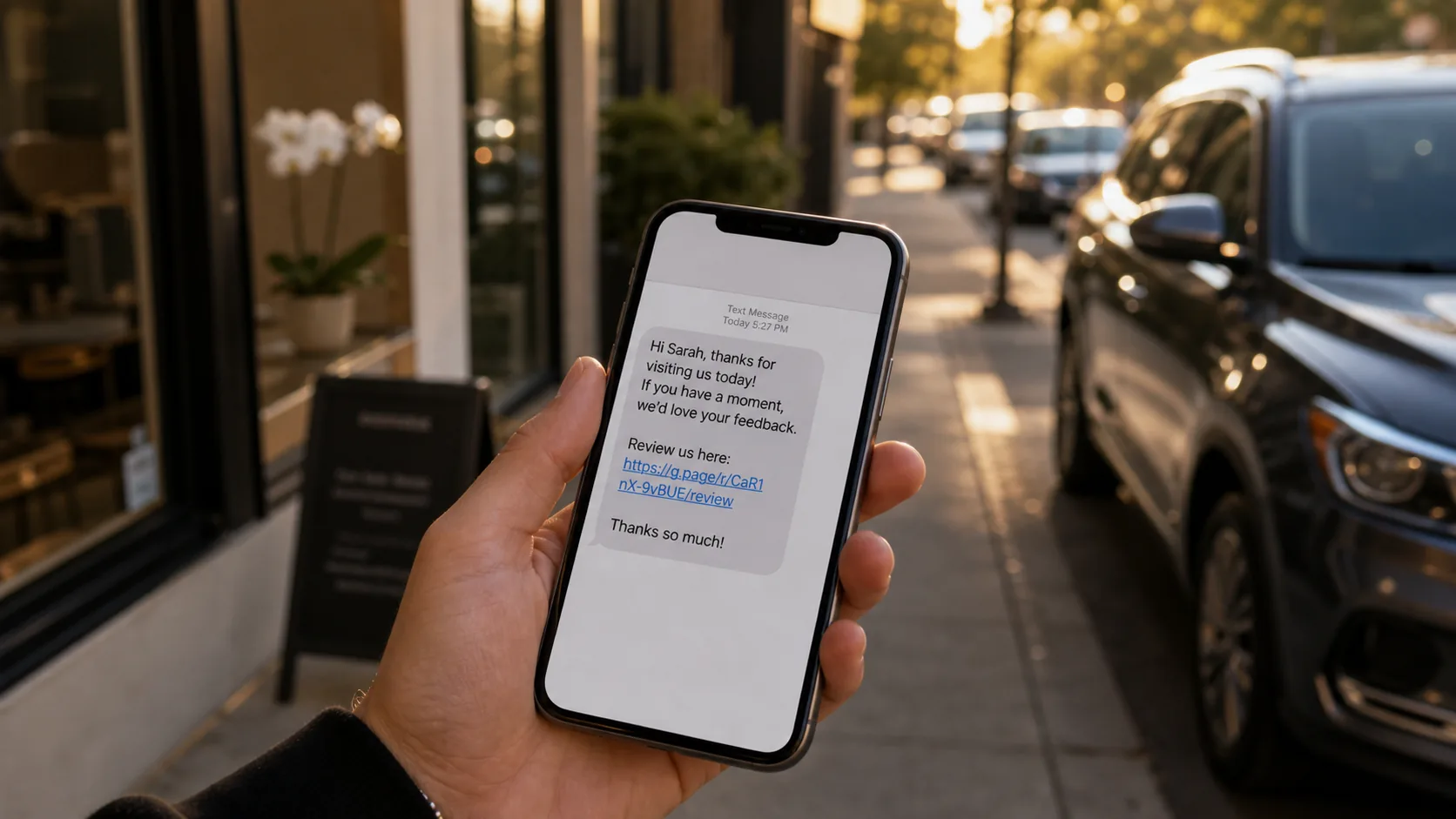
The text that works is short. Two lines, one link. Something like:
Hi [first_name], thanks for stopping in today — really glad we could help. If you have 20 seconds, a quick Google review would mean a lot: [review_link]
That's the whole thing. Use the customer's first name (it's not creepy, people use names in conversation). Mention what happened in a quick phrase like "for the haircut today" or "for the install this afternoon." Put the link last so the thumb lands on it without scrolling.
What not to do: don't apologize for asking, don't tell them how important reviews are to you, don't include three different links, don't ask a survey question first, and don't say "if you had a great experience..." That last one in particular looks like soft gatekeeping, both to Google and to the customer.
A note on incentives
Don't offer anything in exchange for a review. No discounts, no free coffee, no coupons, no draw entries, no points. Google's policy is clear that reviews have to be voluntary, and businesses that incentivize routinely get their reviews filtered or removed. I unpack the full policy and the gray areas in the post on paying for Google reviews.
Three Ways Operators Get This Wrong
Even with a good system in place, three failure patterns show up over and over. Each one is invisible from the inside, which is the worrying part. The owner thinks the system is running, and it isn't.
The first is silent failures in the SMS path. The system says it sent. The customer never actually got the text. This usually comes down to carrier filtering, registration issues, or stale phone numbers, and it can quietly cut your real volume in half. The fix is checking deliverability monthly, not just looking at the "sent" count.
The second is filtering happy customers and skipping unhappy ones. Owners build a flow that asks customers to rate privately first, and only the 4- and 5-star folks get sent to Google. That's review gating, and Google calls it deceptive. They've gotten better at detecting it and a lot less tolerant of it. Don't build the flow that way. Ask everyone. Honestly, the occasional 1- or 2-star review, handled well, actually builds trust over time, because a pure 5-star average with no negatives just looks fake.
The third is asking the wrong person. The customer who matters for the review is the one who decided where to go and how to feel about it. For a salon, that's the person in the chair, not the friend along for the ride. For a vet visit, it's the owner who booked, not the partner who drove. If you ask the wrong person, you usually get nothing.
A Sequenced Approach by Business Type
The exact placement to start with depends on what kind of business you're running. Below is the order I'd ship things in for each, assuming you only have time to do one thing per month.
| Business type | First | Second | Third |
|---|---|---|---|
| Salon / spa | Post-visit SMS | Counter iPad check-in | Stylist-personalized SMS template |
| Dental practice | Post-visit SMS | Front-desk iPad check-in | HIPAA-safe wording pass |
| Restaurant | Bill-fold QR | Server-triggered SMS at check close | Reservation no-show follow-up |
| Coffee shop | Counter QR linked to a tap-to-text | Loyalty-tied SMS opt-in | Time-of-day A/B on send window |
| HVAC / home services | Tech close-out SMS | Dispatch-system auto-trigger | Post-install photo upload prompt |
| Veterinary | Post-visit SMS (sensitivity-aware) | Pet-name personalized template | Annual reminder with review prompt |
| Auto detailing | Hand-off SMS at vehicle pickup | Pickup-window QR | Mobile-detail post-job SMS |
The pattern across all of these is the same. Get the post-experience SMS running first. That's where most of the volume comes from. Then build the placement that gives customers the cleanest path to the same moment, usually a kiosk for walk-ins or a QR for sit-down service. Then refine the message until conversion stops moving.
What the High-Performing Operators All Have in Common
After watching plenty of businesses do this well and badly, the operators who get the most reviews share three things, and really only three.
First, they ask every customer, automatically. Not "every customer who seems happy." Not "the ones I remember." Every customer.
Second, they ask quickly. Within the hour, not within the week. SMS first, email as backup.
Third, they respond to every review that comes back. The 5-stars get a real, specific thanks. The 1-stars get a measured, public reply that owns whatever's worth owning. Responding signals to Google that you're actively running the business, and it signals to the next customer reading reviews that there's a real person here paying attention.
Do those three things, and your Google profile will start compounding within ninety days. I've yet to see a business that does all three and doesn't at least triple its review velocity in the first quarter.
Frequently Asked Questions
Frequently Asked Questions
- How long should I wait to send a review request after a visit?
- Send within 30 minutes to 4 hours of the visit ending. Inside that warm window, conversion runs 25-30%. After 24 hours it drops below 4% on the same message.
- Is it against Google policy to offer a discount for a review?
- Yes. Google explicitly prohibits offering anything of value in exchange for reviews, including discounts, gift cards, contest entries, or free products. Incentivized reviews get filtered or removed and can put the whole profile at risk.
- Should I text or email customers for Google reviews?
- Text first. SMS converts 6-8x higher than email for review requests because it lands inside the warm window and gets read in minutes. Use email only as a follow-up at 48-72 hours for customers who did not tap the SMS.
- How many Google reviews do I need to rank in the local pack?
- There is no fixed threshold, but recent review velocity matters more than total count. A profile getting two reviews a week typically out-ranks a profile with three times as many reviews that get one a month.
- Is it okay to ask only happy customers for reviews?
- No. Filtering happy customers to Google and routing unhappy ones to a private form is called review gating, and Google considers it deceptive. Ask every customer the same way and let the ratings fall where they fall.
- How do I get review requests in front of walk-in customers without a phone number?
- Use a counter or kiosk check-in that captures name and phone in two taps. It logs the visit and triggers the post-visit SMS automatically, without staff needing to remember to ask.
The good news is that none of this needs a CMO, a $2,000 reputation-management subscription, or a part-time hire. You just have to pick a system, turn it on, and leave it on. If you'd rather skip the assembly and have the SMS, kiosk, and replies running by tomorrow, that's what I built ThankYouReview for. Otherwise, pick the placement that fits your business from above, ship it this week, and let the warm window do the work.
Keep reading

How to Respond to Negative Google Reviews (With 12 Templates That Actually Work)
12 copy-and-paste response templates for one-star reviews, plus the framing that turns a complaint into a public win.
Google Review Email vs SMS: What 100,000 Sent Requests Actually Showed Us
We ran the data on tens of thousands of review requests sent via email and SMS. The conversion gap is bigger than most owners realize.
Can You Pay for Google Reviews? What Google's Policy Actually Says
Paying for reviews is against Google's policy — but the line between incentive, gift, and bribe is fuzzier than most owners think.