
The Operator's Guide to Review Request Automation
Most local-business owners I talk to have the same story about review automation. They bought a tool, wired it to their POS, watched it send a handful of awkward emails three days after each visit, and quietly switched it off six weeks later. The Google profile didn't budge. So they wrote off "automation" as a buzzword and went back to asking customers in person, which they forget to do four times out of five. The problem wasn't automation. The problem was that nobody told them which part to automate, in what order, or what the actual trade-offs were.
This post is the long version of that conversation. I'll cover what review-request automation really means, where most people start in the wrong place, the three triggers that work, the channels ranked by conversion, and the timing window you genuinely can't hit by hand.
What "Automation" Actually Means in Practice
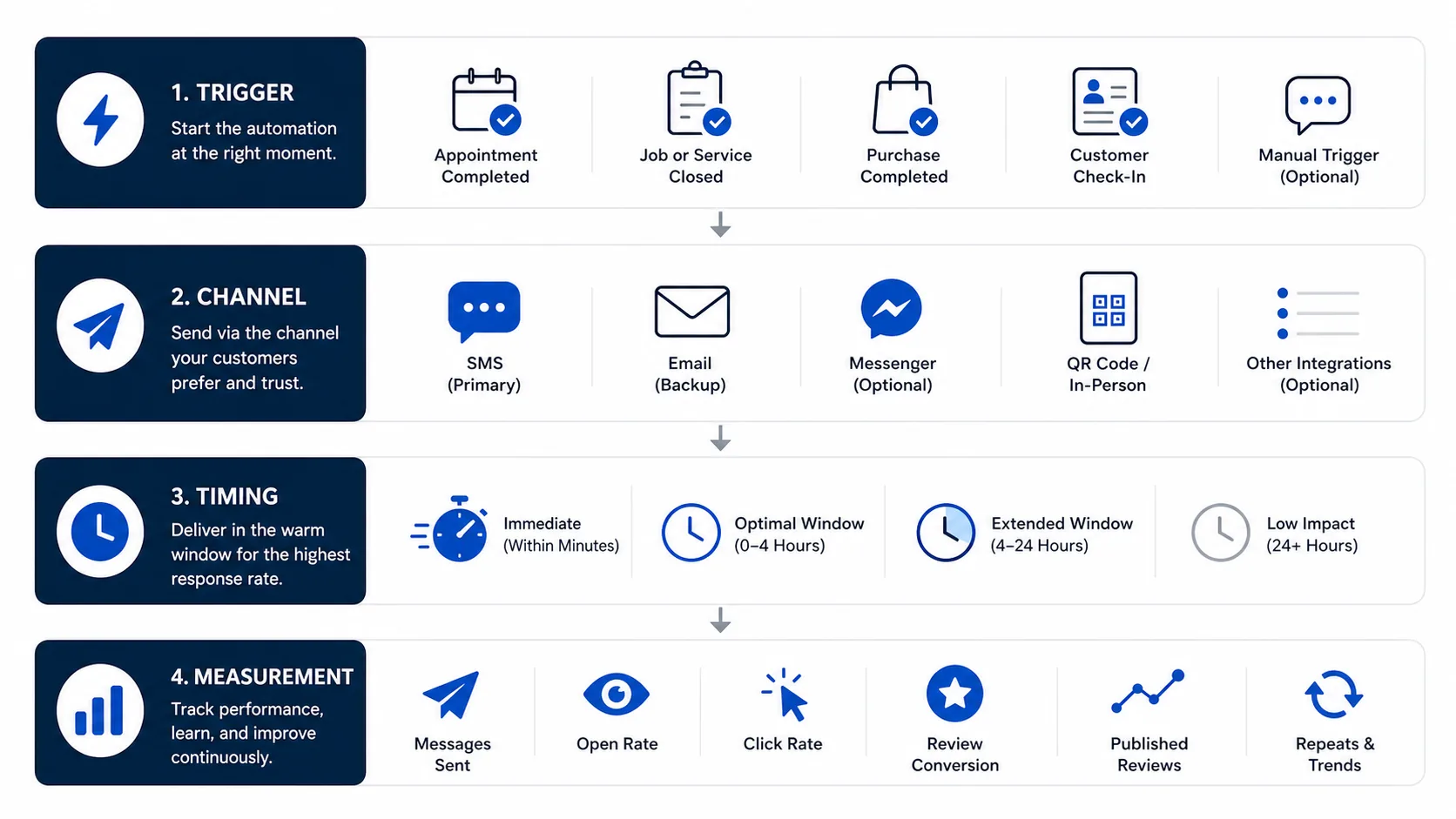
When most people say "review automation," they mean an email that goes out some interval after a customer visit. That's automation in roughly the same way a clock-radio is a smart speaker. Technically true, practically useless. Real automation has four layers, and most owners are only running one of them.
The first layer is the trigger: the event in your day that tells the system a customer just had a complete experience. The second is the channel: SMS, email, or in-person QR. The third is the timing: how long after the trigger the message fires, and whether that delay actually fits the channel. The fourth is the measurement layer: not just "we sent 200 texts," but how many delivered, how many got tapped, and how many turned into a published review.
If any one of those layers is missing or wrong, the whole thing stops compounding. An owner with a great trigger but bad timing (say, an email sent two days later) ends up with the same result as someone with no trigger at all. An owner with perfect timing but the wrong channel, email instead of SMS, leaves half the conversion on the table. And the owner who has all three but no measurement layer never figures out why a perfectly good system suddenly went quiet last month. Usually that's a carrier-filtering issue, sometimes a stale phone-number export.
The owners who win with automation aren't running the fanciest stack. They're the ones who got all four layers in roughly the right shape and then left them alone.
Why Most Operators Start With the Wrong Piece
Almost every owner I've watched start this work begins with the wrong layer: the message. They spend a week polishing the wording, A/B testing subject lines, going back and forth on whether to include a smiley face. Meanwhile the trigger is "the end-of-month export" and the channel is email.
The wording barely matters compared to the other three layers. I've seen identical messages convert at 28% in one business and 3% in another, and the entire difference was send-time. One went out within an hour. The other went out four days later. The first rode the warm window. The second landed cold.
So the order should be: trigger first, channel second, timing third, message last. If your trigger is "the owner remembers," you don't actually have a system. You have a habit, and habits decay within a quarter.
The Three Triggers That Actually Work
A trigger is whatever fires the request. For a local business, only a handful are operationally clean enough to actually rely on. I've watched every variant of "track customer journey" come and go. What holds up across categories is these three.
The first is a POS or booking-system event: a paid invoice in Square or Toast, a closed appointment in Mindbody or Vagaro, a completed job in Housecall Pro or ServiceTitan. This is the cleanest trigger because the system already knows the appointment ended and already has the customer's phone number. The work is in the integration, not the workflow change. If your stack supports it, this is the right place to start.
The second is a manual mark-as-served by a staff member. A button on a tablet, a quick action in the front-desk software, a checkbox in the daily list. This works when the POS event isn't precise enough. For example, the restaurant where the bill closes thirty minutes before the customer actually leaves, or the salon where the appointment is marked complete the moment the customer sits down. A staff tap on "done" is a more accurate signal of "the experience is over" than the POS thinks. The trade-off is the human element. Somebody has to remember to tap it. Done right, this is high-quality data. Done sloppily, it's worse than the POS event, because half the customers never get logged.
The third is a kiosk check-in at the door. The customer taps in with name and phone when they arrive, and the system fires the review request a configured amount of time later based on the average visit length for that business. This is the right shape for walk-in businesses where neither the POS nor the staff workflow gives you a reliable end-of-visit signal: coffee shops, urgent care, walk-in salons. The kiosk also gives you a count of visits, which most walk-in businesses have never had, and the review-conversion math falls out of that.
Pick the one that fits your operation. Don't try to run all three from day one. The mistake I see most often is owners wiring up two or three triggers at once and ending up with duplicate sends, conflicting timestamps, and one very angry repeat customer who got the same review request three times.
Channels in Priority Order: SMS, Email, Kiosk
Once the trigger is set, the next decision is which channel carries the ask. There's a clear hierarchy here.
SMS is the primary channel. Open rates above 95% within minutes, click-through rates in the high teens to mid-twenties, and the customer sees the ask while the experience is still in working memory. For almost every local-business category I've measured, SMS converts three to six times better than email. If you do nothing else, run SMS.
Email is the follow-up channel. It's there to catch the customers who didn't tap the SMS, and there will always be some. A single email two or three days later with the same link and slightly different framing ("we know it's easy to forget, if you have a second") recovers a meaningful slice of the customers who would otherwise drop off. Don't lead with email. It's the cleanup hitter, not the leadoff.
In-store QR or kiosk is the third layer, and it does a different job than the other two. It converts the walk-in who didn't give you a phone number, and it captures the high-intent customer who would have left a review anyway but didn't know how. The QR doesn't replace SMS for anyone already in your system. It backstops the gaps in your data.
For most owners the sequence is SMS within the hour, email at 48-72 hours if no review yet, and a QR at the counter as the always-on layer. I cover the head-to-head conversion data in the email vs SMS post. If you're starting cold and only have time for one piece, start with SMS.
The Timing Window You Can't Manually Hit
Here's the single most important number in this whole piece: for most local services, a review request sent within an hour of the experience ending converts roughly 6-8x better than the same request sent twenty-four hours later. Same customer, same message. The difference is the warm window, the period when the experience is still fresh enough that a small ask doesn't feel like work.
The practical implication is that you can't hit this window manually. The owner who plans to send out the review texts at end of day is already past the window for half their customers. The team that promises to text customers from the front desk forgets during the rush. The bookkeeper who exports the day's appointments and sends a batch the next morning is converting at 4%, not 25%, and has no idea.
Inside the first four hours, conversion is roughly flat. Anywhere from thirty minutes to four hours works fine. After four hours, decay sets in. By twenty-four hours, you're down to a fraction of what you could have had. By forty-eight hours, you're basically running an email campaign with all the conversion that implies.
This is the whole case for automation. Not "saving time," not "scalability." Those are real but they're secondary. The case is that there's a window the human running the business literally cannot hit, every day, for every customer, on time, without help.
Personalization That Lifts Conversion (and the Kind That Backfires)
Once the basic system is running, there's a temptation to make the texts feel more personal. Some of that works. A lot of it backfires.
The personalization that lifts conversion is small and concrete: the customer's first name, the service they just had ("for the haircut today"), and where possible the staff member's name ("Maya said it was great to see you"). Three short data points, none of them surprising. This kind of personalization moves conversion by a few points and costs almost nothing to set up, since the data is already in your booking system.
The personalization that backfires is the kind that tries too hard. The text that recites the customer's full appointment history. The "I noticed it's been six months since your last visit" line that reads as surveillance. The one that mentions a detail the customer didn't realize was being tracked ("we hope your new puppy is doing well"). All of these read as creepy, and a non-trivial number of customers reply asking to be removed. The rule of thumb: if a friendly host could plausibly remember it, fine. If only a database could remember it, leave it out.
The other mistake worth flagging is soft-gating wording, the "if you had a great experience, please consider..." kind of line. Google considers this review gating and they've gotten much better at detecting it. Ask everyone the same way. I cover bad request copy in the common review-text mistakes breakdown.
Opt-Out Handling and the Analytics Layer
Two pieces of the system get neglected because they're invisible from the dashboard. Both will quietly tank your numbers if you don't think about them.
The first is opt-out handling. Any SMS that goes to a customer who has previously replied STOP, UNSUBSCRIBE, QUIT, or any of the carrier-recognized variants must not be sent. Not "should not." Must not. The carriers enforce this and so does the FCC. A well-built system handles this automatically, suppresses the number across all future sends from your account, and logs it for audit purposes. A badly-built system relies on staff to maintain a do-not-text list, which is the same as not having one. I get deeper into the compliance picture in the TCPA post. For this guide, just know that opt-out is a hard requirement, not a setting.
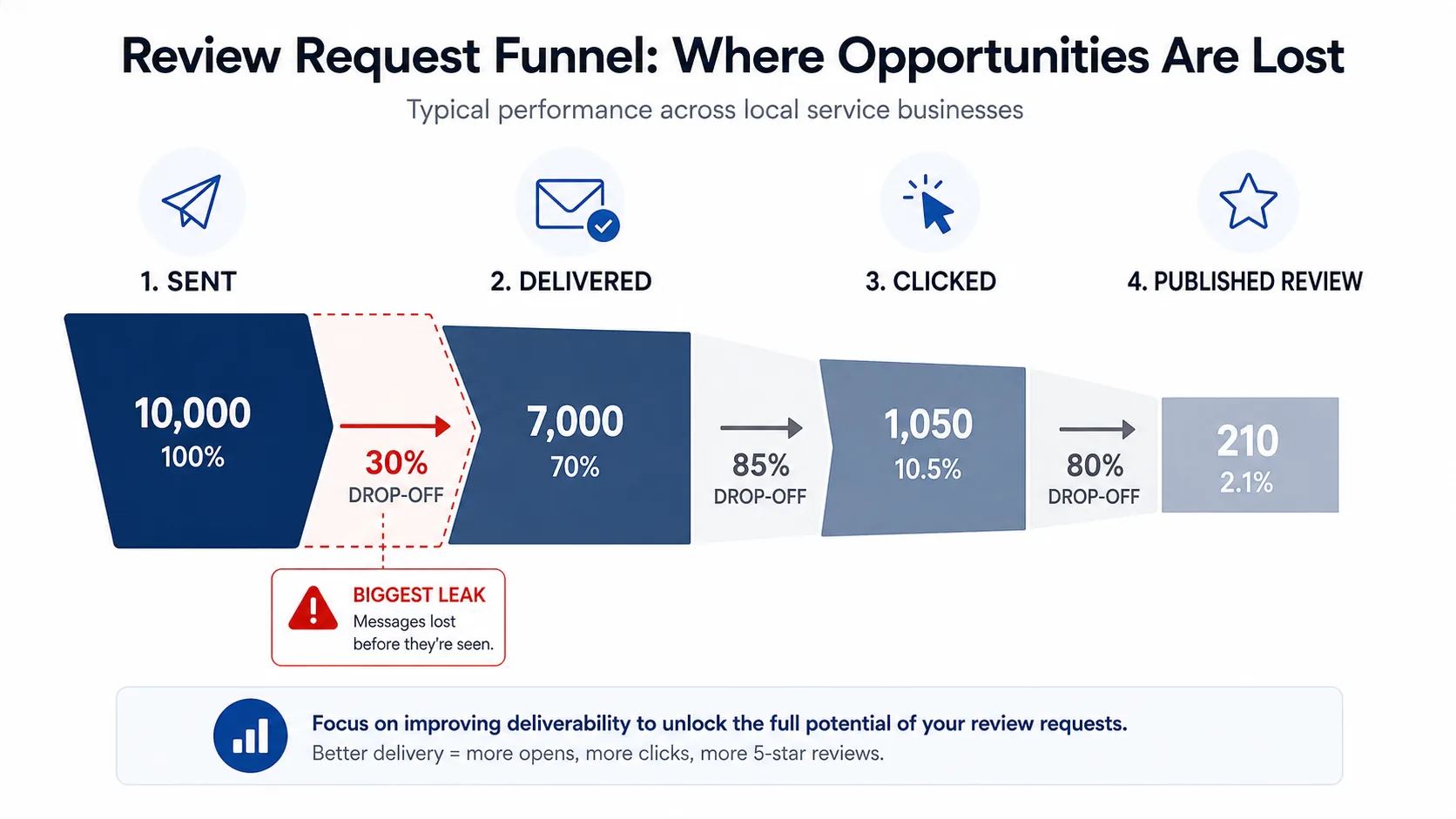
The second is the analytics layer: the difference between sent, delivered, clicked, and review-published. Most owners look at the "sent" number and stop there. That number is almost meaningless. What you actually want to see, in order:
- Sent — the system fired the message
- Delivered — the carrier accepted it and put it on the customer's phone
- Clicked — the customer tapped the review link
- Review-published — a new review appeared on your Google profile within the window
The gap between sent and delivered is where carrier filtering hides. The gap between delivered and clicked tells you whether your message is doing its job. The gap between clicked and published tells you whether your Google Business Profile listing is set up correctly (broken review links are more common than they should be). If you don't have those four numbers for last month, your system is running blind, and the day a carrier silently filters half your sends, you won't know about it until the reviews dry up.
Build vs Buy: An Honest Trade-Off
If you're technical, you can build this. A Twilio account, a Postmark account, a webhook from your POS, a small app to hold the templates and the suppression list, a Sheets dashboard, and a few hundred lines of glue code. I've seen owners do it on a long weekend. I've also seen them spend six months on it and abandon the whole thing when SMS deliverability got weird and they had no idea how to debug carrier filtering.
The honest trade-off:
| Dimension | Build it yourself | Buy a tool |
|---|---|---|
| Up-front time | 1–6 weeks of dev | Same-day setup |
| Ongoing maintenance | Yours forever | Vendor's problem |
| Carrier registration (A2P 10DLC) | You navigate it | Pre-built |
| Deliverability tuning | You debug it | Vendor monitors |
| Cost at low volume | Free + Twilio fees | $40–$150/mo typical |
| Cost at very high volume | Cheaper at scale | Tiered pricing |
| Customization | Unlimited | What the tool supports |
For most owner-operators sending under a few thousand requests a month, buying wins on every dimension except absolute cost, and the cost difference is smaller than one no-show appointment a month. For larger multi-location operators with a real engineering team, building can pencil out, but the team has to actually exist and have spare cycles.
The middle path that almost never works is "I'll have my cousin build it." Review automation looks simple from the outside and gets surprisingly hairy at the deliverability layer. If you have a strong engineer who owns it, build. Otherwise, buy.
If you've already read the pillar piece on how to get more Google reviews, this is the implementation layer underneath it. The strategy is ask everyone, fast, with replies on the back end. Automation is what makes that strategy survive contact with a real Tuesday afternoon.
Frequently Asked Questions
Frequently Asked Questions
- What is the best trigger for sending an automated review request?
- Whichever event most accurately marks the end of the experience: a POS-paid invoice, a manual mark-as-served by staff, or a kiosk check-in plus a configured delay. Pick one, not three; duplicate triggers send the same customer multiple requests.
- How long after a visit should an automated review request go out?
- Between 30 minutes and 4 hours. Inside that window, conversion is roughly flat and high. After 24 hours, conversion falls below 4%. A human cannot hit this window manually across every customer, every day.
- Should I integrate review automation with my POS or use a kiosk?
- Use the POS or booking system if it cleanly marks end-of-visit. Use a kiosk when neither the POS nor staff workflow gives a reliable end-of-visit signal, like in walk-in coffee shops or urgent care.
- What metrics should I track for review request SMS?
- Sent, delivered, clicked, and published-review. The gap between sent and delivered exposes carrier filtering. The gap between clicked and published exposes a broken review link or unverified GBP.
- Is it cheaper to build review automation in-house with Twilio?
- For most owner-operators sending under a few thousand requests a month, buying a tool wins on every dimension except absolute cost, and the cost gap is smaller than one no-show appointment. Building pencils out only at high volume with a real engineer maintaining it.
- How do I make sure my review request texts don't get filtered?
- Register the brand and campaign under A2P 10DLC before your first send, use the Customer Care or Account Notification category, include a working STOP opt-out in every message, and keep send volume consistent with what you registered.
Short version: get the trigger right, send by SMS within the hour, treat email as the cleanup, watch delivered instead of sent, handle opt-outs as a hard rule, and don't get cute with personalization. Do that and your Google profile will compound for the rest of the year. If you'd rather skip the assembly and have all of the above running by tomorrow afternoon, that's what I built ThankYouReview for, and you can see what it costs on the pricing page.
Keep reading
TCPA Compliance for Review Request Texts: What Every Local Business Should Know
A plain-English guide to TCPA compliance for review-request SMS — consent, opt-out, A2P 10DLC, and the mistakes that get businesses sued.

Why Your Review Request Texts Aren't Working: Five Mistakes Most Owners Make
The five quietest reasons your review-request texts aren't converting — and the fixes that take a 6% open-to-review rate to 30%.
How to Get More Google Reviews in 2026: A Playbook for Local Operators
A practical, end-to-end playbook for getting more 5-star Google reviews without bribing customers or breaking Google's policies.