

Google Business Profile Optimization: The 2026 Checklist
Ask a local owner how their Google Business Profile is doing and you'll get one of two answers. Either "I think it's fine, I haven't touched it in a year," or "I've been messing with it every week and I still can't tell if it's working." Both are really the same problem in different clothes. Nobody tells you what to optimize, in what order, or what's a waste of time. So owners either freeze or they spin, and the profile sits at about the same visibility it had on day one.
This checklist is what I'd hand an owner sitting down with their profile in 2026. It's organized in the order that actually moves the needle, not the order Google's dashboard nags you about. I'll walk through what to set, what to skip, what gets profiles suspended, and a sequenced approach for what to do this week, this month, and this quarter.
What Operators Get Wrong About GBP Optimization
The most common pattern I see is owners treating the profile like a website. Something you build once and revisit when it breaks. Google Business Profile is closer to a live feed. The ranking algorithm rewards activity as much as it rewards completeness, and a profile that hasn't been touched in six months is competing with profiles that get fresh photos and review replies every week. The businesses can be identical in quality and still end up with very different visibility.
The second pattern is over-indexing on the wrong fields. Owners spend an hour tweaking the description (which barely moves anything) and skip the primary category choice (which moves everything). They obsess over their business name and ignore their photos. They post three Google Posts a week for a month and then quit, which is honestly worse than not posting at all because it makes the profile look abandoned.
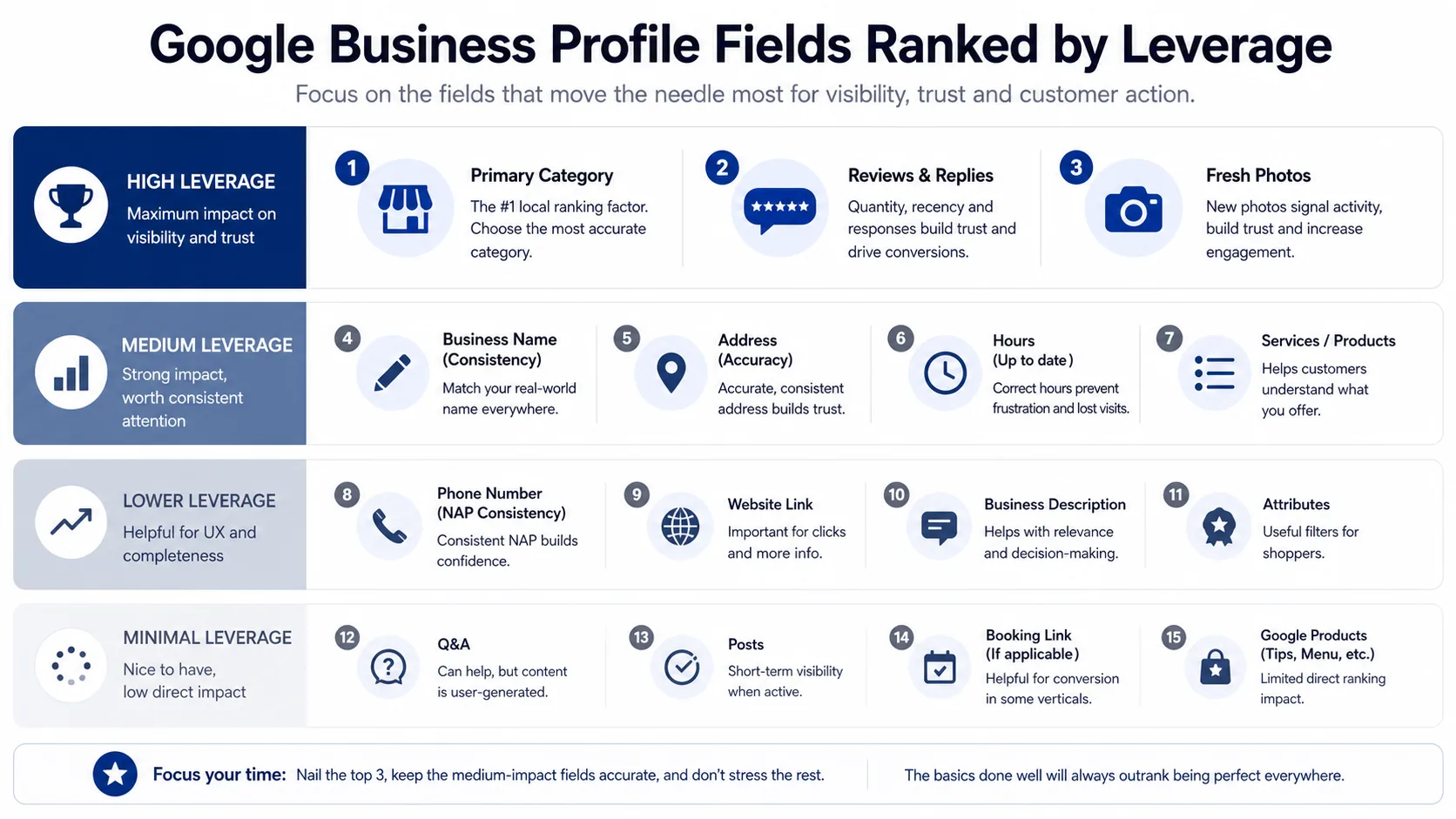
The right frame is to rank the fields by leverage. Primary category, reviews, photos, and replies do the heavy lifting. Hours, services, attributes, and Q&A are table stakes. Posts, products, and messaging are optional polish. Treat them in that order and the profile compounds. Treat them in the order Google's dashboard nags you about and you'll burn an afternoon for almost no gain.
Your Primary Category Is the Most Important Choice on the Page
If you only do one thing this week, audit your primary category. The primary category determines which searches you're eligible to appear in. A hair salon listed as "Beauty Salon" competes in a different bucket than one listed as "Hair Salon," and the search volume between those two terms in a given city can differ by 5x or more.
The mistake most owners make is picking the category that feels most complete, the broadest one that covers everything they do. Broad sounds safe. In practice it's the worst choice. Google's local algorithm rewards specificity, because specificity is what lets the algorithm match you to a high-intent searcher. "Pizza Restaurant" beats "Restaurant" for the pizza search, even though the restaurant category is technically true.
The opposite mistake, going hyper-niche, is rarer but real. Listing yourself as "Neapolitan Pizza Restaurant" when 90% of your sales are regular delivery pizza means you'll show up for a tiny audience and miss the larger one. Usually the right answer is the category that describes the one thing you most want to be found for, not the category that's most accurate to your full menu.
Secondary categories help, but they don't replace the primary. They give Google additional context and let you appear in adjacent searches, but the primary category is what controls your competitive set. I unpack the full research process, including which tools to use and how to scan competitor categories, in the guide to picking the right GBP category.
The Business Name Trap That Gets Profiles Suspended
Every few months an owner asks me some version of "should I add my service to my business name? Like change it from 'Smith Plumbing' to 'Smith Plumbing - Emergency Plumber Austin'?" The answer is no, and not because it doesn't work. It does work, in the short term. The problem is that it's a Google Business Profile policy violation, and the consequence is suspension. Suspensions can take weeks to recover from, and sometimes they never recover at all.
The rule is simple. Your business name on the profile has to match the name on your signage, your storefront, your invoices, and your legal registration. If your dental practice is called "Riverside Family Dentistry," that's what goes on the profile. Not "Riverside Family Dentistry - Best Dentist in Riverside." Not "Riverside Family Dentistry | Implants & Veneers." Just the name.
Google has gotten dramatically better at detecting keyword stuffing in business names over the past two years. The 2026 version of the algorithm flags new edits to business names almost automatically, and competitors do report profiles that break the rule. The reward for compliance is durability. A clean name is a profile that doesn't get suspended the week before your biggest season.
If your legal name happens to include a keyword, like "Austin Emergency Plumbing LLC," you're fine to use it because that's your actual registered name. But you can't manufacture one for SEO. The line is whether the name exists outside the profile, on real-world signage and documents.
Services, Products, and Attributes: Easy Wins Most Profiles Skip
The services list is one of the highest-leverage fields almost nobody fills out. Services tell Google which sub-searches you're relevant to within your primary category. A salon that lists "Balayage," "Keratin Treatment," and "Bridal Hair" individually has a meaningfully better shot at ranking for each of those specific terms than a salon that lists nothing.
The trick is being exhaustive. Most owners list five services. Top-performing profiles list 20 to 40, each with a one or two sentence description and a price if you're comfortable showing one. It's tedious work. It's also the kind of optimization a competitor can't easily copy on the same afternoon.
Products are the same idea for retail and restaurants. A coffee shop with 30 product entries (each drink, each pastry, each retail bag) outperforms one with three. Restaurants get a small ranking boost from a complete menu, plus the menu shows up directly in search.
Attributes are the small toggles like "wheelchair accessible," "free Wi-Fi," and "outdoor seating." Each one is a filter that searchers can apply, and missing attributes means missing those filter pages. Spend ten minutes turning on every attribute that's honestly true.
Hours, Including Special Hours, Including the Holidays You Forgot
Hours sound trivial. They're not. A profile with wrong hours during a holiday is a profile that gets a 1-star "they were closed" review from someone who drove across town and found the lights off. That's a permanent dent on the profile for an entirely preventable reason.
Set your regular hours. Then set special hours for every holiday. Not just the obvious ones, but Memorial Day, Labor Day, the 4th of July, Thanksgiving, Christmas Eve, New Year's Eve, and any local holidays that matter in your market. If you close early on Christmas Eve, mark it. If you're open normal hours on Thanksgiving, mark that too. Google will surface "open on Thanksgiving" as a signal to searchers, and it's worth real foot traffic.
The other one to set is "more hours," the secondary hours field for things like delivery, drive-through, takeout, kitchen, and senior hours. These are separate from your main hours, and a restaurant that has both regular and "kitchen closes at 10pm" hours filled in shows up more cleanly in search.

Photos: The Quiet Ranking Lever Most Owners Ignore
If I had to pick the single most underrated ranking signal in 2026, it would be photo activity. Google's local algorithm appears to reward profiles that get fresh photos regularly, both from the business and from customers. Stale profiles with the same six photos from three years ago consistently lose ground to active profiles in the same category, even when the active ones have fewer reviews.
The categories of photos that matter, roughly in order: cover photo (this is what shows in the knowledge panel), logo, exterior (so people can identify the storefront from the street), interior (so they know what to expect when they walk in), team (humans build trust), products or services (the thing you sell, in detail), and behind-the-scenes shots like prep and before-and-afters.
The cadence is what matters most. A few new photos a month, not 30 photos once and then nothing for a year. The algorithm cares about recency. A salon that uploads a single fresh before-and-after every week has a meaningful edge over a salon that uploaded a portfolio in 2024.
The pattern to worry about is the dead profile with 200 photos all dated three years ago. From Google's perspective, that profile might as well be closed. The cure is one fresh photo a week, ideally taken on a phone, ideally with the customer's name and the date in the EXIF. It takes a manager 30 seconds and it visibly moves your visibility within a quarter.
Reviews and Replies: The Compounding Signal
There's a whole playbook on getting more Google reviews, so I won't repeat the full thing here. For the optimization checklist, two things matter.
The first is review velocity. Google appears to weigh recent reviews more than older ones. A profile with 80 reviews that gets two a week beats a profile with 300 reviews that gets one a month. Total count is a vanity metric. Rate-per-week is the operational one. The owners who win are the ones who automated the post-visit ask and stopped relying on memory.
The second is replies. Replying to every review, 5-star and 1-star alike, does two things. It tells Google the profile is actively managed, which is a ranking signal. And it tells the next customer reading reviews that you're a real human running the place, which is a conversion signal. The 1-star replies in particular punch above their weight. There's a full breakdown of the right structure in the guide to responding to negative reviews.
The shortcut that backfires is replying only to the bad ones. Now the only replies on the profile are defensive responses to complaints, which is the worst possible signal to a customer skimming reviews. Reply to the good ones too. A simple "thanks Sarah, glad the balayage worked out, see you next month" takes ten seconds and is worth more than another marketing email.
Posts, Q&A, and the Features Worth Your Time
Google Posts are the feature owners always ask about, and honestly, they're worth it for new businesses and marginal for established ones. A profile with no reviews and no history gets a small visibility lift from posting regularly because it signals to Google that the business is real and active. A profile with 200 reviews and a steady photo cadence gets almost nothing from Posts, and the time would be better spent on review replies and fresh photos.
If you do post, the right cadence is once a week, not three times a day. Each post should be a real piece of information: a new service, a seasonal offer, a holiday hours change, an actual announcement. Empty posts like "Happy Friday everyone!" look like noise and don't help.
Q&A is genuinely useful and almost nobody uses it. Anyone can post a question on your profile, and anyone can answer it, including you. The right move is to seed the Q&A section with the questions you actually get every week ("do you accept walk-ins?", "do you take this insurance?", "is parking free?"), answer them in your own voice, and let the answers do support work for the next searcher. This costs you 15 minutes once and earns back hours of phone calls.
Messaging is a feature to enable only if you can actually respond within an hour. Google publicly shows your average response time on the profile, so if you're going to take a day to reply, leaving messaging off is better than enabling it.
Booking integrations like Reserve with Google or OpenTable are worth setting up if your category supports them. They cut down the friction between search and conversion enormously. A salon that lets a searcher book directly from the knowledge panel turns a chunk of those searches into appointments without ever fielding a phone call.
Service Area Businesses: The SBA Setting That Trips People Up
If you're a service-area business (HVAC, plumbing, anything that goes to the customer) there's a specific setting that determines whether you show up at all. Service-area businesses can either show their storefront address, if they have one, or hide it and just show a service area. The choice has consequences for which searches you appear in.
If you don't have a public storefront, hide the address and define your service area precisely by city, ZIP, or radius. Service areas that are too wide ("we serve all of California") get filtered down by Google to a much narrower radius automatically. Service areas that are too narrow miss eligible searches. The right answer is usually the area you'd reasonably drive to, plus 10–15%.
If your profile suddenly stopped showing up, the service area is one of the first things to check. The full diagnostic is in the post on why GBPs disappear from Maps.
A Sequenced Approach: This Week, This Month, This Quarter
Here's how I'd order the work if you only had limited time.
This week: Audit your primary category against three competitors in your area. Confirm your business name follows the no-keyword rule. Set or correct your hours, including special hours through the next two holidays. Upload three fresh photos. Reply to every unreplied review.
This month: Build out the services list to at least 15 entries with descriptions. Turn on every honest attribute. Seed the Q&A with your five most common customer questions and answer them yourself. Set up a process, even an informal one, for the front desk or manager to upload one new photo per week.
This quarter: Wire up automated post-visit review requests so the volume is steady and not dependent on anyone remembering. Set up a booking integration if your category supports it. Audit the profile quarterly for stale info, suspended categories, and any new GBP features that have rolled out. Google ships changes constantly, and the 2026 checklist will look different from the 2027 one.
The pattern across all of this is the same as everything else in local. Compounding beats sprinting. A profile that gets ten minutes of attention every week for a year outperforms a profile that gets ten hours of attention once and then nothing. Find the cadence, set the reminders, and let the system run.
Frequently Asked Questions
Frequently Asked Questions
- What is the most important field on a Google Business Profile?
- Primary category. It determines which searches you are eligible to appear in. A salon listed as Beauty Salon competes in a different bucket than one listed as Hair Salon, and the volume gap between those terms can be 5x or more.
- Can I add keywords to my Google business name to rank higher?
- No. Google's 2026 detection on keyword-stuffed business names is aggressive and the consequence is suspension. Your profile name has to match your signage, invoices, and legal registration.
- How often should I post photos to my Google Business Profile?
- At least one fresh photo a week, taken on a phone. Recency matters more than volume. Stale profiles with 200 old photos lose ground to active ones with fewer total photos but a steady cadence.
- Do Google Posts help local search ranking?
- They help new profiles with no review history more than established ones. For a profile with steady reviews and fresh photos, posts are marginal. If you do post, once a week with real information beats three empty posts a day.
- Should service-area businesses show or hide their address?
- Hide it if you do not have a public storefront customers can walk into. Showing a residential or virtual address triggers suspension. Define the service area by the cities you actually drive to, plus a 10-15% buffer.
- How long does it take to see results from GBP optimization?
- Primary category and business name changes trigger a re-review of a few days to two weeks. Photo and review velocity compound over 30-90 days. NAP cleanup across directories takes 30-60 days to fully reweight.
The hardest part of GBP optimization isn't knowing what to do. It's keeping the cadence. The owners who win on local search aren't the ones who built the perfect profile in one weekend. They're the ones who reply to every review, upload one fresh photo a week, and ask every customer for feedback without thinking about it. If you want the asking and replying part on autopilot so you can focus on the rest, that's what ThankYouReview handles. Either way, start with the primary category this week and let the rest follow.
Keep reading

Why Your Google Business Profile Isn't Showing Up in Maps (and How to Fix It)
Seven concrete reasons your Google Business Profile isn't showing up in Maps — ranked by how often we see them in real audits.

GBP Categories: How to Pick the Right One (It Matters More Than You Think)
Your primary GBP category is the single highest-leverage choice on your listing. Here's how to pick it — and how to use secondary categories well.

How to Get More Google Reviews in 2026: A Playbook for Local Operators
A practical, end-to-end playbook for getting more 5-star Google reviews without bribing customers or breaking Google's policies.