

GBP Categories: How to Pick the Right One (It Matters More Than You Think)
The conversation usually goes like this. An owner sets up their Google Business Profile, sees a dropdown labeled "primary category," picks whatever sounds closest to what they do, and never thinks about it again. Six months later, they're frustrated they're not ranking. They're tweaking their description, uploading photos, posting weekly, and the entire time the one field that actually determines what searches they appear in is set wrong. "I didn't realize the category was that important" is the line I hear most often when I explain what's going on.
It is important. Of all the fields on a Google Business Profile, the primary category does the most work. It controls your competitive set. It controls which "near me" searches you appear in. It controls what features Google shows on your profile (a restaurant gets menu fields; a dentist gets insurance fields). And it's the field most owners pick in 30 seconds without research and then never revisit.
This post is what that 30 seconds should have been. I'll walk through what the primary category actually does, the two traps that trip up most owners, three concrete ways to research the right choice, when to use secondary categories, when and how to change a primary that's wrong, and a tour of real examples across common local categories.
What Your Primary Category Actually Does
The primary category is Google's first-pass filter on which searches you're eligible to appear in. When someone searches "Italian restaurant near me," Google looks at the primary category of every business in the searcher's geographic radius and almost exclusively pulls from businesses whose primary category is "Italian Restaurant." A pizza place with primary category "Pizza Restaurant" can technically appear, but it's filtered to a less-relevant tier.
The secondary effect is what features Google attaches to your profile. A "Restaurant" primary category unlocks menu, reservations, and food delivery integrations. A "Doctor" primary category unlocks insurance fields and appointment booking. A "Hair Salon" unlocks service-with-price entries and the booking widget. Pick the wrong primary and you don't just rank for the wrong searches, you also lose the right features.
The tertiary effect is conversion. A searcher who clicks through to your profile and sees a category that doesn't match what they expected is more likely to bounce. "Spa" listed as the primary for what's actually a hair salon will pull in massage-seekers who leave immediately. The category is also a promise to the searcher, not just a signal to Google.
What the primary category doesn't do is control your search ranking within the eligible set. That's a separate algorithm based on reviews, proximity, prominence, NAP consistency, and a long list of other things. So the category gets you eligible to compete. Everything else determines whether you win.
The Hyper-Niche Trap
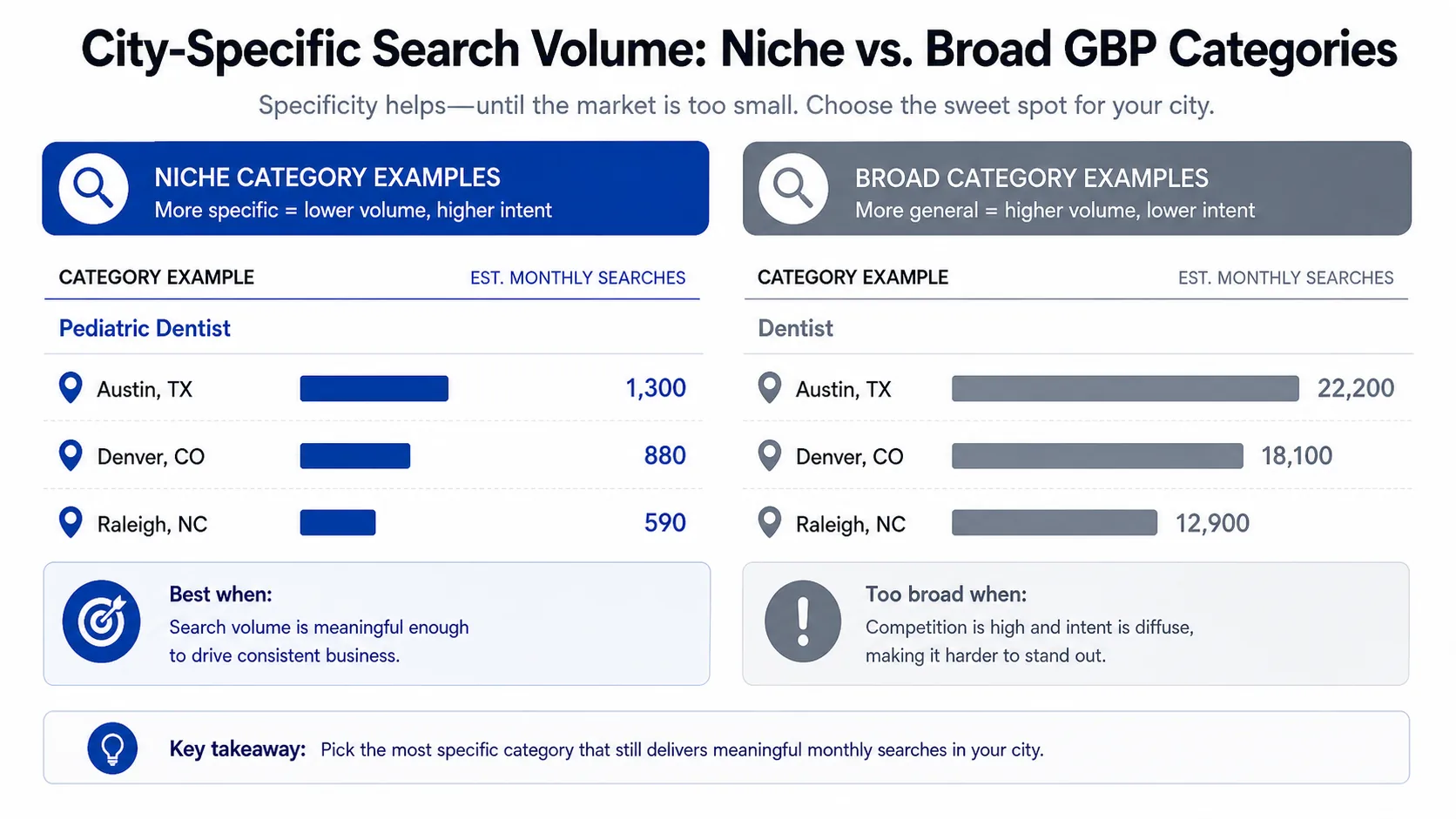
The most common mistake I see in 2026 is owners picking a category that's too specific. A pizza-and-pasta restaurant that lists itself as "Neapolitan Pizza Restaurant" is technically accurate but commercially wrong, because the search volume for "Neapolitan pizza" in most cities is a fraction of the volume for "pizza" or "Italian restaurant." The hyper-niche category sounds impressive and ranks well, but it ranks well for a search almost nobody runs.
The other version of this is owners who pick a category that describes one of their services rather than their core business. A medspa that lists itself as "Botox Clinic" because Botox is the highest-margin service is missing every "medspa near me" search and competing in a tighter niche. Pick the category that describes what the business is, not what the highest-margin product is.
The diagnostic is simple. Search the term you actually want to rank for. Then search the terms that are one level broader. If your category matches the narrower term and you're missing the broader one, you're in the niche trap. The fix is usually moving primary to the broader category and adding the niche term as a secondary.
The Hyper-Broad Trap
The opposite mistake is real too. Owners pick the broadest category that's technically accurate because it sounds safe: "Restaurant," "Beauty Salon," "Doctor," "Contractor." The logic is "I want to be found for everything." The result is that you compete in the largest possible competitive set, against businesses with more reviews and longer histories, for searches that often aren't even your ideal customer.
A barber shop listed as "Beauty Salon" is competing against women's salons in the same area. It's going to lose those searches because the women's salons have more relevant reviews and photos. Meanwhile, "Barber Shop," a specific and popular search term, is sitting unclaimed. Specificity wins almost every time.
The diagnostic for the hyper-broad trap: search the broader term you're listed under and see who's in the top 3. If they're all businesses meaningfully larger or longer-established than you, you're competing in the wrong bucket. Move to a more specific category and watch what happens to the searches you actually convert on.
The line between hyper-niche and hyper-broad isn't an exact science. The rule of thumb is to pick the most specific category that still has meaningful search volume in your geography. "Italian Restaurant" beats "Restaurant" almost always. "Neapolitan Pizza Restaurant" beats "Italian Restaurant" only if you're in a market with real volume for that term, usually a major metro with a foodie scene, not a suburb.
How to Research the Right Category (3 Methods)
Picking the right category isn't guesswork. There are three concrete methods that get you the answer in under an hour combined.
Method 1: The Competitor Scan
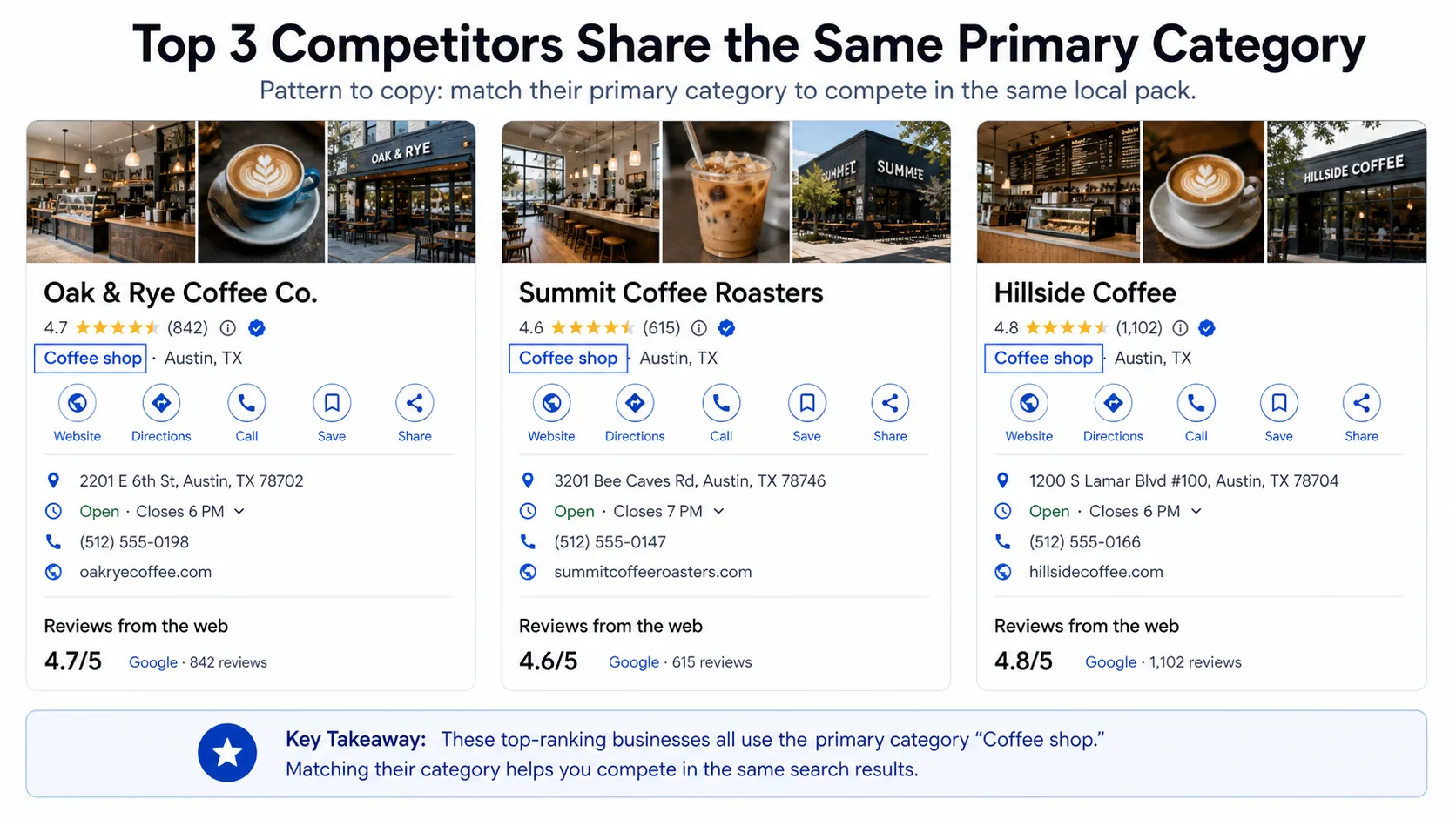
Open an incognito tab. Search the term you want to rank for, from a location near your business (you can adjust your location in Chrome dev tools or just search from your office). Look at the top 3 results in the local pack. Click each one and find their primary category. It's listed right under the business name on the profile.
If all three share a primary category, that's your answer. Make yours match. If they're split across two categories, pick the one whose listing most resembles your business model.
This method works because Google has already done the analysis. The top 3 in the local pack got there partly because their category matches what searchers want. Copying the category gets you in the eligible set, and the rest of your optimization determines whether you win.
Method 2: The Category Tool
PlePer's free GBP category tool lets you search across the entire taxonomy of Google Business Profile categories and see how each one relates to others. It's useful for two things: discovering categories you didn't know existed (Google has thousands), and identifying the right secondary categories to pair with your primary.
A common discovery in this tool is finding a category that's perfectly suited to your business but isn't well-known to owners. "Hair Replacement Service" is a real category. So is "Make-Up Artist," "Tattoo Removal Service," and "Eyebrow Bar." If your business does something specific that has its own category, that category usually has lower competition than the broader bucket.
Method 3: The Search Volume Sanity Check
Take your top 3 candidate categories and search each one as a "near me" query in incognito. Look at how many results appear in the local pack and how detailed they are. If a category returns sparse, low-detail results, the search volume is probably low and the category isn't worth fighting for. If it returns a dense pack of well-optimized profiles, the volume is real.
You can also use Google Trends to compare the relative search interest across category terms in your specific city or state. The differences can be eye-opening. In some markets "Hair Salon" outsearches "Beauty Salon" by 10x. In others it's the reverse. Pick based on your market, not on what feels intuitive.
Together, these three methods take maybe 45 minutes and tell you the right answer with high confidence. Most owners skip all three and pick from intuition. Don't be that owner.
Secondary Categories: Useful, But Not What You Think
Secondary categories let you add up to nine additional categories to your profile. Owners often assume secondaries give you ranking lift in those categories' searches. They don't, not meaningfully. Secondaries do two other things instead.
The first is unlock features. Adding "Caterer" as a secondary to a restaurant unlocks catering-related fields and lets you appear in catering directories within Google. Adding "Wedding Service" to a salon unlocks bridal-related fields. The features matter more than the ranking lift.
The second is provide context. Google's algorithm uses secondary categories to refine its understanding of what your business does, which can subtly improve ranking within your primary category's competitive set. A "Hair Salon" with secondaries of "Beauty Salon," "Waxing Hair Removal Service," and "Eyebrow Bar" is more likely to rank for "hair salon with eyebrow services" than a profile with no secondaries.
The mistake owners make is adding every category that's tangentially relevant, hoping to rank for all of them. That doesn't work, and it actually dilutes the algorithm's understanding of your business. Stick to 3–6 secondaries, each one a real part of your service mix. If you do it twice a year, it's a one-off, not a secondary.
Should You Ever Change Your Primary?
Owners get anxious about changing their primary category. The fear is that Google will penalize the profile, reset its history, or trigger a suspension. Mostly, none of that is true. Changing the primary triggers a brief re-review, typically a few days to two weeks, during which visibility can be inconsistent. After the re-review, the profile resumes ranking under the new category and the historical activity (reviews, photos, etc.) carries forward.
When you should change it: you picked the wrong category at setup, your business model has shifted (a salon that now does 60% bridal is probably a "Wedding Service" primary), or your competitor scan revealed your current category is wrong for your target searches.
When you should not change it: you're impatient about ranking and looking for any lever, you've been changing categories every two months, or your primary is correct but you're chasing a higher-volume but less-relevant search.
The right way to change it: do it once, in a planned way, after you've researched alternatives. Don't change it again for at least 90 days. Rapid category swaps look like spam to the algorithm and can trigger a manual review, which is the worst outcome.
If your profile vanishes after a category change, that's normal for the first few days. The diagnostic is covered in the post on GBPs not showing up in Maps. Don't change it back unless visibility doesn't return in 21 days.
Examples Across Common Local Categories
Below are real-world category decisions I run into most often. Each one is a judgment call, but the reasoning carries over to similar businesses.
Salon/spa: For a salon that does primarily women's hair, "Hair Salon" almost always beats "Beauty Salon." For a salon that does cuts, color, and significant lash and wax services, "Beauty Salon" might win because it includes more of what you do. For a barbershop, "Barber Shop." For a medspa, "Medical Spa," not "Spa."
Restaurant: Specificity wins. "Italian Restaurant" beats "Restaurant." "Pizza Restaurant" beats "Italian Restaurant" if pizza is more than half your revenue and is the search term that drives traffic in your market. "Mexican Restaurant" beats "Tex-Mex Restaurant" in most markets because volume is higher. For a coffee shop that also serves food, "Coffee Shop" almost always beats "Café" or "Restaurant."
Dental: "Dentist" is the default. Use "Cosmetic Dentist," "Pediatric Dentist," or "Orthodontist" if that's your specialty and more than 50% of revenue. Use secondaries for the other services. The category-to-specialty mapping affects which insurance-finder integrations you appear in.
HVAC: "HVAC Contractor," "Heating Contractor," or "Air Conditioning Contractor." Pick based on what your service mix actually looks like and which one has more search volume in your region (northern markets favor heating, southern favor AC). Use secondaries for the others.
Auto: "Auto Repair Shop" is the default. Try "Mechanic," "Auto Body Shop," "Oil Change Service," "Brake Shop," or "Transmission Shop" if you're specialized. "Car Detailing Service" if that's your primary line. The auto category tree is unusually deep, so spend extra time on the research.
Real estate: "Real Estate Agency" if you're a brokerage. "Real Estate Agent" if you're an individual under a brand. "Property Management Company" if that's your primary line, not a side service. Picking "Real Estate Agency" when you're an individual agent is the most common miscategorization here.
Legal: "Lawyer" if you're a generalist. Otherwise "Personal Injury Attorney," "Family Law Attorney," or "Estate Planning Attorney." Pick based on what you actually want to be hired for, not what you're occasionally hired for. Legal categories convert at radically different rates by specialty.
The thread across all of these is the same. Pick specific over broad when there's enough search volume to justify it. Pick the category that matches what you most want to be hired for, not what you currently do most of. Use secondaries for the rest. And revisit the choice once a year, especially if your service mix has shifted.
Tying It Back to the Full Profile
Picking the right primary category is the single highest-leverage move on the profile. It's also one of seven or eight optimization areas that compound. Once your category is right, the next moves are reviews and review velocity, fresh photos, replies, complete services, attributes, and the rest of what's covered in the full GBP optimization checklist.
The order matters. A perfectly optimized profile in the wrong category will still underperform a half-optimized profile in the right one, because the category sits upstream of everything else. Get that right first, then layer the rest on top.
Frequently Asked Questions
Frequently Asked Questions
- How many secondary categories should I add to my Google Business Profile?
- Three to six, each a real part of your service mix. Google lets you add up to nine, but more dilutes the algorithm's understanding of what you actually do. If you offer the service twice a year, it is not a secondary.
- Can I rank for searches outside my primary category?
- Yes, but only weakly. Secondary categories provide context and unlock features, not direct ranking in those categories' searches. The primary category is the field that controls your competitive set.
- How do I find my competitor's primary GBP category?
- Search the target term in incognito from a location near your business, open the top result's profile, and look right under the business name. The primary category is listed there. Free tools like PlePer surface this faster across multiple competitors.
- What happens if I change my primary category?
- It triggers a re-review of a few days to two weeks, during which visibility can be inconsistent. Historical reviews and photos carry forward. Do not change it back unless visibility has not returned after 21 days.
- Should a barbershop use Barber Shop or Beauty Salon as its primary category?
- Barber Shop. Specificity wins. Listing as Beauty Salon puts you in competition with women's salons that have more relevant reviews and photos for that bucket, and you miss every Barber Shop search.
- Is it bad to pick a hyper-niche GBP category?
- Yes if the search volume is too low to matter. Neapolitan Pizza Restaurant is technically accurate but commercially wrong in markets where customers search for Pizza or Italian Restaurant instead. Pick the most specific category that still has real volume.
If you take one thing from this, open an incognito tab today, run the competitor scan above, and confirm your primary category matches the top 3 results in your target search. If it doesn't, plan the change carefully and execute it once. The rest of your optimization will work harder when the category is right. And once the foundation is set, the activity loop of fresh reviews, replies, and photos is what compounds. That's the part ThankYouReview keeps running on autopilot so you don't have to think about it every week.
Keep reading

Google Business Profile Optimization: The 2026 Checklist
A field-tested GBP optimization checklist for local businesses that want to rank in the local pack and convert from the listing itself.

Why Your Google Business Profile Isn't Showing Up in Maps (and How to Fix It)
Seven concrete reasons your Google Business Profile isn't showing up in Maps — ranked by how often we see them in real audits.

How to Get More Google Reviews in 2026: A Playbook for Local Operators
A practical, end-to-end playbook for getting more 5-star Google reviews without bribing customers or breaking Google's policies.