
Why Your Google Business Profile Isn't Showing Up in Maps (and How to Fix It)
There's a specific kind of panic that hits a local owner the first time they search their own business and don't see it on Maps. "I was on the first page last month. I haven't changed anything. Where did I go?" Then they start googling, and the advice ranges from "wait 90 days" to "delete your profile and start over." Neither is right. The actual answer is almost always one of seven concrete things, and most of them are diagnosable in an hour.
This post is the diagnostic I walk owners through when they ask. It's ordered roughly by how often each cause shows up in real audits, with verification issues at the top and "you're just new" at the bottom. For each one, I'll cover how to confirm it's the problem, how to fix it, and what to expect afterward.
Why "Not Showing Up" Almost Never Means What Owners Think It Means
Before getting into the seven reasons, one frame worth setting. When an owner says "I'm not showing up," they almost always mean one of three different things, and the fix depends on which one.
The first is "I don't show up when I search my own business name." That's a serious problem, and it usually means the profile is suspended, unverified, or has a duplicate beating it. The second is "I don't show up when I search my category, like 'dentist near me.'" That's almost always a ranking issue, not a visibility issue, and the causes are different. The third is "I used to show up and now I don't." That's the most diagnosable, because something specific changed.
Figure out which of those three you're dealing with before you start fixing things. Otherwise you'll spend a week optimizing for ranking when the actual problem is a suspension you didn't know about.
One more thing worth knowing. Google's "you appeared in this many searches this month" insight in your dashboard is not a ranking metric. It counts impressions across all searches, including brand searches. A profile can have rising impressions and falling category visibility at the same time. Look at the breakdown between direct searches (people typing your business name) and discovery searches (people typing a category). That's where the real story lives. A drop in discovery searches with steady direct searches usually means a ranking issue, not a visibility issue.
Reason 1: Verification Status Issues
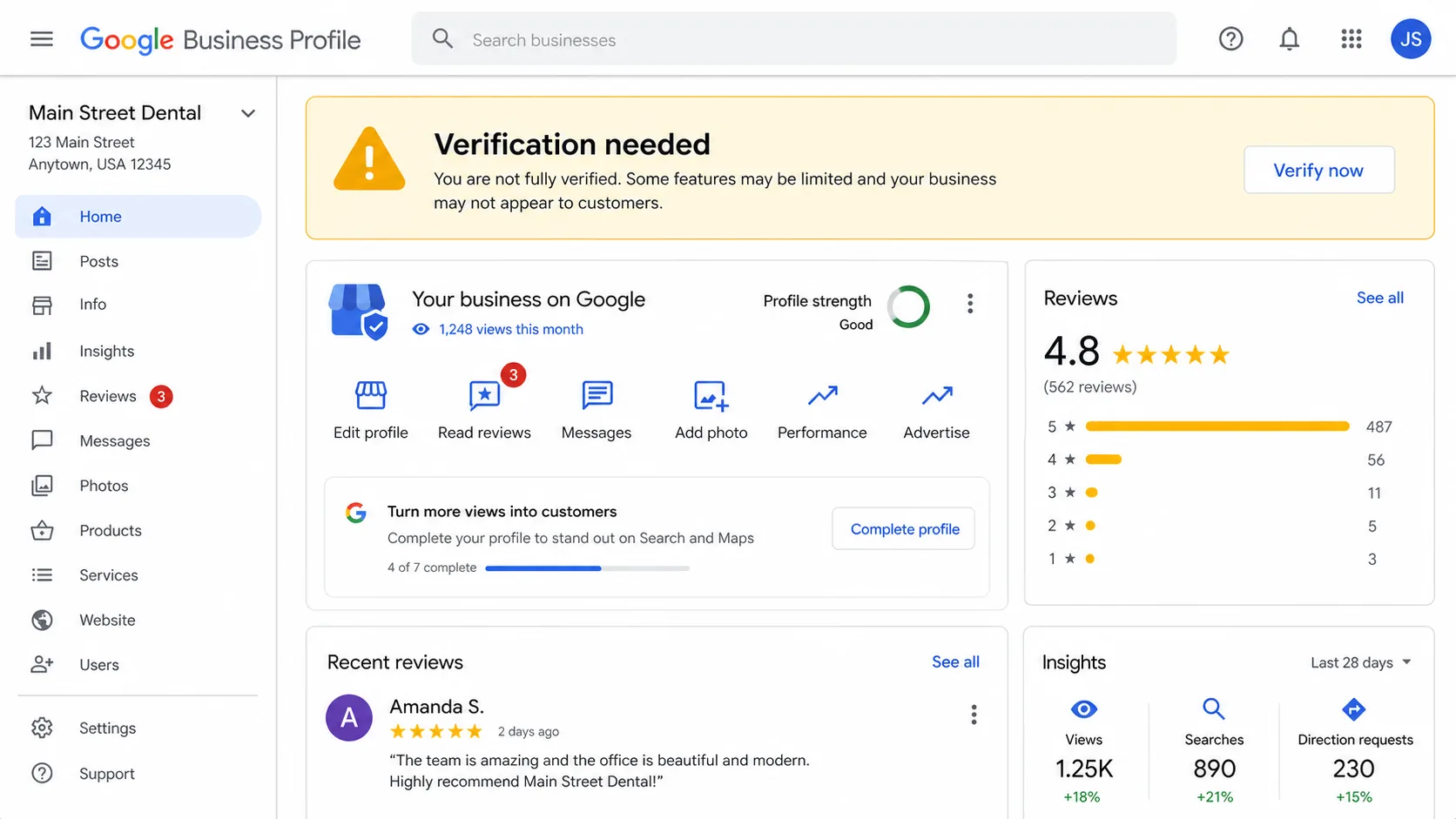
The single most common cause I see for "I'm not showing up at all" is a verification problem. Either the profile was never fully verified, the verification lapsed when ownership transferred, or Google quietly asked for re-verification and the postcard sat in someone's spam folder.
Diagnose by logging into your Google Business Profile dashboard and checking the verification status at the top. If it says "verify now," "verification needed," or anything other than "verified," that's your answer. Unverified profiles can show in search inconsistently, get downgraded, or disappear entirely from Maps.
Fix it by going through whichever verification method Google offers (postcard, phone, email, video, or instant verification through a connected Google service). In 2026, video verification has become the default for most categories, and it's quicker than the postcard route used to be. Expect 5–14 days from completed verification to consistent visibility returning.
The thing to watch out for is owners who assume "I verified it three years ago, so I'm fine." Verification can be revoked, especially after edits to the business name, address, or category. Always check the dashboard first before doing anything else.
Reason 2: NAP Inconsistency Across the Web
NAP stands for Name, Address, Phone. Google looks at how consistently your business information appears across the web (Yelp, Facebook, your own site, Apple Maps, industry directories) and uses that consistency as a trust signal. When your address is "123 Main St, Suite 4" on one site, "123 Main Street #4" on another, and "123 Main, Unit 4" on a third, Google's confidence in your profile drops. Sometimes it drops enough to push you out of the local pack entirely.
Diagnose by searching your business name + city in Google and clicking through to the top 10 results outside of Google itself. Check the name, address, and phone on each. Then run a citation audit tool. There are a handful that scan 50+ directories at once, which catches the long tail.
Fix it by updating the inconsistencies one site at a time. The big ones to prioritize: your own website's footer, Yelp, Facebook, Bing Places, Apple Maps, BBB, and any industry-specific directories. The order doesn't matter much. Consistency does. Expect 30–60 days for Google to re-crawl the changes and reweight your trust.
The hardest version of this is when a business actually moved. The old address shows up on a hundred old directories, and the new one shows up on the official sites. The fix is the same methodical cleanup, but the timeline is longer. Plan for a full quarter to fully migrate.
Reason 3: Profile Suspended (How to Tell, How to Recover)
Suspended profiles are the most painful cause and one of the most common in 2026. Google has gotten dramatically more aggressive about suspending profiles for policy violations, often without warning, and the visible signal is sometimes nothing more than "your profile is no longer eligible to appear on Google."
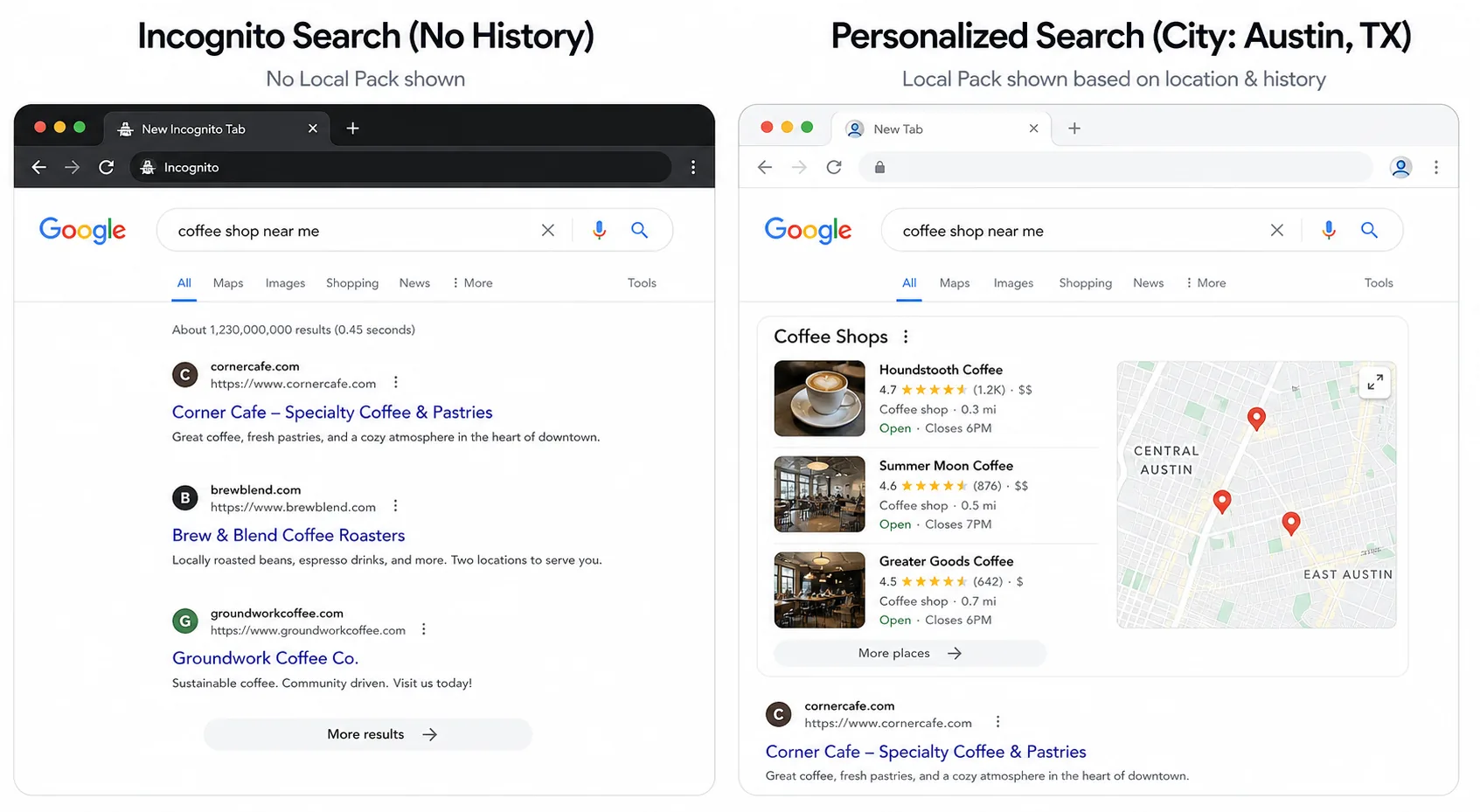
Diagnose by logging into your dashboard. A suspended profile will usually have a banner at the top ("your business profile has been suspended") with a link to learn more or appeal. Sometimes the banner is missing and the only sign is that you can edit fields but they don't appear on Maps. If your dashboard looks normal but the profile is invisible to incognito searchers, suspension is the working hypothesis.
The most common triggers for suspension: keyword stuffing in the business name (the classic), changing the address to one that doesn't match the verified address, adding a category that doesn't match the actual business, virtual office or coworking space addresses for SBAs, multiple profiles at the same address, or stuffing service-area listings into a single location.
Fix it by submitting a reinstatement request through the GBP help form. Be specific about what you changed, attach proof of the business (utility bill, lease, business license, signage photos), and don't argue with Google about whether the rule is fair. Just demonstrate compliance. Expect 5–21 days for the appeal, sometimes longer. If your first appeal is denied you can re-appeal with stronger evidence, but don't appeal twice with the same evidence. That usually goes nowhere.
Prevention is mostly about discipline. Follow the GBP optimization checklist and don't make changes that look like spam. Suspended profiles can take weeks to recover, and the lost foot traffic during that window often costs more than every other optimization combined.
Reason 4: Wrong Primary Category
If your profile is verified, unsuspended, and your NAP is clean, and you're still not showing up for the searches you think you should, the next thing to audit is your primary category. The primary category is the field that controls which searches you're even eligible for. A salon listed as "Beauty Salon" doesn't show up for "hair salon" searches in most markets, even though the categories overlap conceptually.
Diagnose by searching the term you want to rank for (in incognito, from the relevant geography), looking at the top 3 results, and checking each of their primary categories. There are free tools that surface this, PlePer being the common one. If all three top results share a category and yours is different, your primary category is the problem.
Fix it by changing your primary category in the dashboard. Move your current primary to secondary if it's still accurate. Expect a brief re-review period (a few days to two weeks) and then a meaningful shift in which searches you appear in. The full research process is in the guide to picking the right GBP category.
The thing to be careful about is changing the primary category back and forth repeatedly. Google flags rapid category changes as suspicious and you can trigger a manual review. Pick a category, give it 30 days, then evaluate.
Reason 5: Service Area Mistakes
This one mostly affects service-area businesses (HVAC, plumbing, anything that travels to the customer) and it's the source of more silent invisibility than owners realize. The service-area settings determine which geographic searches you appear in, and small mistakes shrink your visible footprint enormously.
The first mistake: setting a service area that's too wide. Owners list every city within an hour and assume more is better. Google's algorithm interprets very wide service areas as low-confidence and often narrows your effective visibility to a much smaller radius automatically. The right answer is the area you'd genuinely drive to for a customer, not the area you could theoretically serve.
The second mistake: hiding your address when you actually have a storefront, or showing it when you don't. SBAs without a public-facing storefront need to hide the address. Storefront businesses with walk-in customers should show it. Getting this wrong puts you in the wrong competitive set, either competing against storefronts you'll never beat, or getting filtered out of "near me" searches you should win.
Diagnose by reviewing your service area settings against your actual operation. Fix it by tightening service areas to the cities you actually serve and toggling the address visibility to match reality. Expect a couple of weeks for visibility to re-stabilize.
Reason 6: Recent Edits Triggering a Re-Review
If your profile was showing up fine until last week, the most likely cause is a recent edit that triggered a manual or automated re-review. This happens after changes to the business name, primary category, address, phone, or service area. During the re-review window the profile can appear inconsistently, sometimes visible and sometimes not, for a few days to a few weeks.
Diagnose by looking at your dashboard's edit history (or your memory of what you changed). If anything significant changed in the last 14 days, re-review is the working hypothesis. The fix is mostly patience. Don't undo the change unless you know it was wrong, because that triggers another re-review on top of the first one and extends the invisibility window.
The thing to be careful about going forward is to batch your edits. If you need to update your name, your category, your address, and your hours, do them all in the same session rather than spread across three weeks. A single re-review is shorter than three separate ones.
Reason 7: You're Actually Just New
Sometimes the answer is the boring one. A brand-new profile, even one that's perfectly set up, doesn't usually appear consistently in the local pack for the first 30–90 days. Google needs time to build confidence in the business by confirming the NAP across the web, accumulating reviews, watching photos go up, and tracking activity signals.
Diagnose by checking the verification date on your profile. If it's less than 90 days old and everything else on this list is clean, you're probably just new. There's no fix. Just time and activity.
What accelerates the process: getting your first 10–20 reviews quickly (steady review velocity is one of the fastest trust signals, and the review playbook covers the cadence), uploading photos weekly, replying to every review as it comes in, completing every field in the profile, and getting cited on at least 5–10 high-authority directories like Yelp and Facebook. None of this is a hack. It's just the activity Google uses to build confidence.
The thing to avoid is trying to "game" early visibility by buying citations in bulk or fake-trafficking the profile. Both leave footprints that earn suspensions in 2026 far faster than they used to.
What to Check First, Second, Third
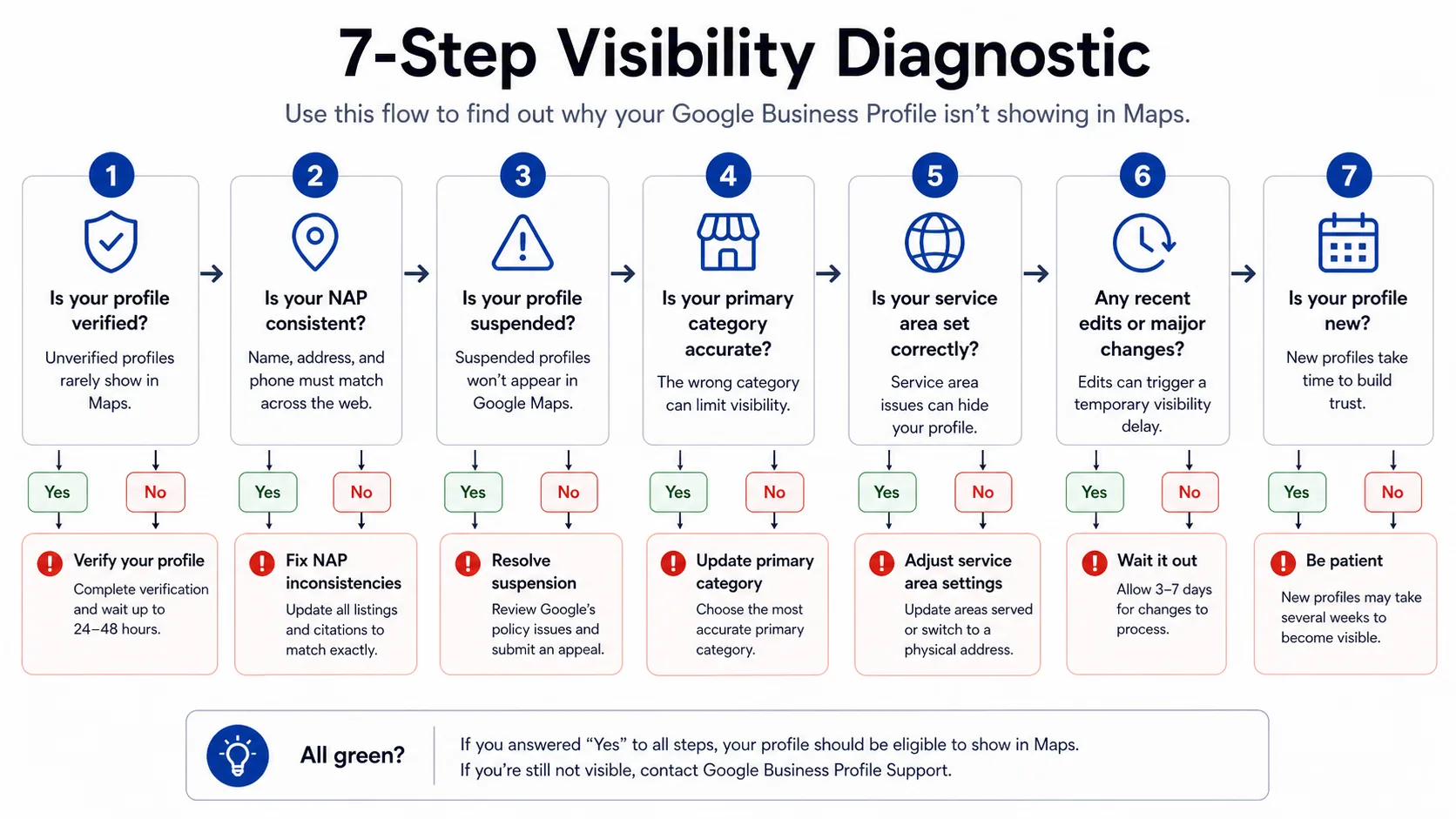
If you're staring at a profile that isn't showing up and don't know where to start, here's the order I'd run the diagnostic.
First, the verification status. Open the dashboard, look for any banner about verification, and confirm the profile says "verified." If it doesn't, that's your problem and nothing else matters until it's fixed.
Second, suspension status. Same dashboard, look for a suspension banner. If you see one, start the reinstatement process today. The timeline is long enough that every day matters.
Third, the recent edit window. Have you changed anything material in the last two weeks? If so, re-review is probably the cause and the answer is patience.
Fourth, the primary category against the top 3 competitors for your target search. If theirs match and yours doesn't, change it.
Fifth, NAP consistency across the top 10 directories. Run an audit, list the inconsistencies, fix them in order of authority.
Sixth, the service area, if you're an SBA, against the cities you actually serve. Tighten it if it's too wide.
Seventh, the profile age. If you've ruled everything else out and the profile is under 90 days old, you're probably just new. Keep stacking the activity signals.
The pattern across all of this is that "not showing up" is almost never one ambiguous problem. It's one of seven specific things, and the diagnostic takes a couple of hours. Once you find it, the fix is usually concrete and the timeline to recovery is measurable. The owners who panic and start changing five things at once make the diagnosis impossible. The ones who work the list in order recover, almost always.
Frequently Asked Questions
Frequently Asked Questions
- Why did my Google Business Profile suddenly disappear from Maps?
- Most common causes in order: a recent edit triggered a re-review (3-14 days), the profile was suspended for a policy issue, or verification lapsed. Check the dashboard banner first; do not change anything else until you know which it is.
- How long does Google take to reinstate a suspended GBP?
- Typically 5 to 21 days for the appeal, sometimes longer. Submit through the GBP help form with documented proof of the business (utility bill, lease, license, signage photos). If the first appeal is denied, re-appeal with stronger evidence, not the same evidence.
- Does Google penalize you for changing your primary category?
- No, but changing it triggers a brief re-review during which visibility can be inconsistent. Change it once based on competitor research, then leave it alone for at least 30 days.
- How do I check if my GBP is suspended?
- Log in to the GBP dashboard. A suspension banner usually appears at the top. If the dashboard looks normal but the profile is invisible to incognito searchers, suspension is still the working hypothesis.
- Why don't I show up for 'near me' searches even though I'm verified?
- Most often a wrong primary category or a service area that is too wide or too narrow. Search your target term in incognito, look at the top 3 results' primary category, and match it. Tighten service areas to the cities you actually serve.
- How long until a new Google Business Profile appears in the local pack?
- Typically 30 to 90 days, even when the profile is perfectly set up. Google needs time to build confidence: NAP consistency across directories, accumulating reviews, photo uploads, and replies all accelerate the process.
If you're in the middle of a visibility drop right now, work the list above before doing anything else. Most of what I see in audits is one of the first three reasons (verification, NAP, or suspension), and fixing those three covers the majority of cases. Once visibility is back, the long-term defense is steady activity: fresh photos, weekly review velocity, and replies on everything. That's the part ThankYouReview automates so you can keep the profile healthy without thinking about it every Tuesday.
Keep reading
Google Business Profile Optimization: The 2026 Checklist
A field-tested GBP optimization checklist for local businesses that want to rank in the local pack and convert from the listing itself.
GBP Categories: How to Pick the Right One (It Matters More Than You Think)
Your primary GBP category is the single highest-leverage choice on your listing. Here's how to pick it — and how to use secondary categories well.

How to Get More Google Reviews in 2026: A Playbook for Local Operators
A practical, end-to-end playbook for getting more 5-star Google reviews without bribing customers or breaking Google's policies.